I built an AI bot to read our kids' school email. Here's what I'd tell you before you build one.
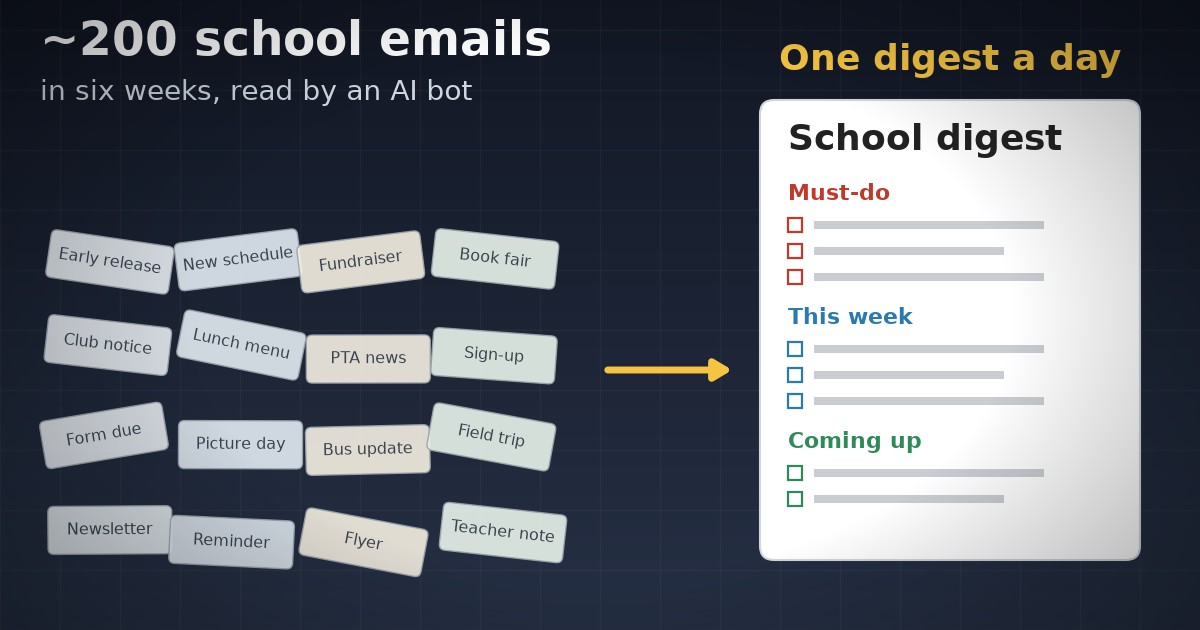
Image credit: author, drawn with code
This is a story about how my wife and I went from several school emails and texts a day to one short digest every afternoon, and about what it took to trust an AI bot to write it. Getting the bot to summarize was the easy part. Most of the work went into deciding what it is not allowed to do, and into catching the times it got something wrong without saying so.
If you read my first post, this is the same idea in a very different setting. There, automated tests were the gate that let AI agents write code for a system that trades real money. Here, the gate is a short list of things the bot can never do, plus one place where every rule it follows is written down.
Why Build a Bot for School Email?
We have two kids at two different schools, a 5th grader and a 2nd grader. Between the district, both schools, the teachers, the parent groups, the after-school club and the flyers, the messages never really stop. We were getting multiple emails and texts a day, and I figured a bot would be a good way to consolidate the noise.
I counted afterwards. In the six weeks from September 9 to October 21, 2026, roughly 200 emails came in that were actually about school, or a bit over 30 a week. Over the same weeks, the kids’ sports team app sent another 120. Some of the school mail is duplicated, too, e.g. the after-school club often sends the same notice once for each kid.
On top of that, the schools use TalkingPoints, an app for school announcements and teacher messages, and those never reach email at all. In one sample week it had about 13 announcements and 3 active conversations with teachers. In other words, keeping up meant reading all of that email and then remembering to open a separate app every day.
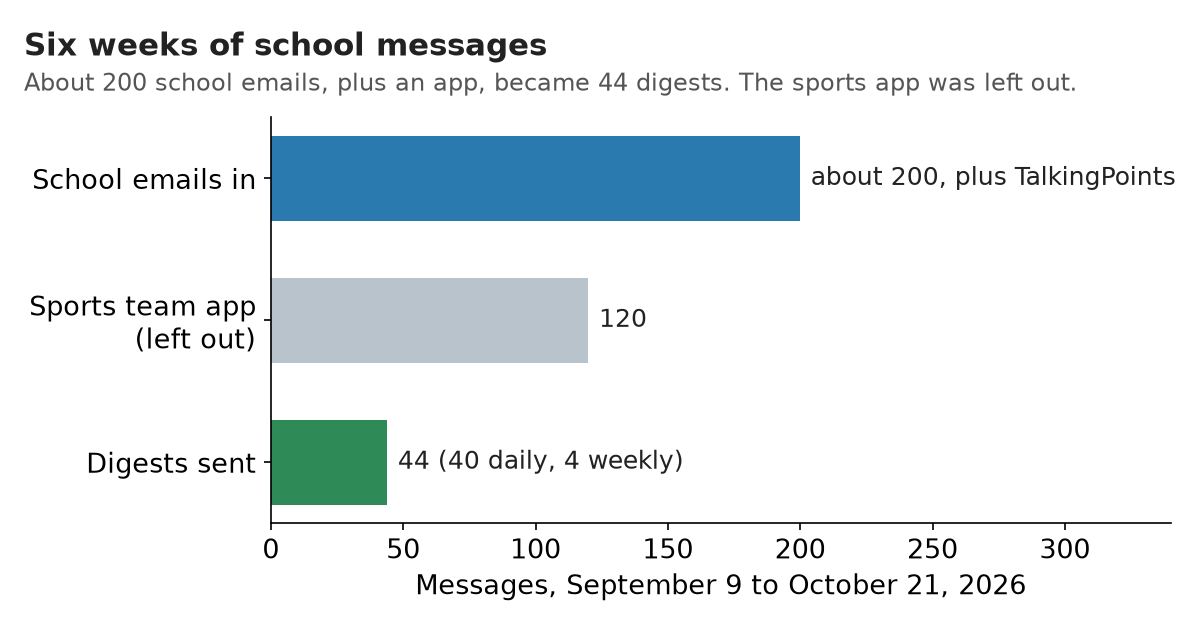
Six weeks of school messages. TalkingPoints isn’t in the count, because it never reaches email.
What Does the Bot Actually Do?
Every afternoon, the bot reads the new school mail in Gmail and the new messages in TalkingPoints. It follows the links to the full newsletters instead of trusting the preview in the email, and then it writes one digest. Everything is grouped by school, with the must-dos first. Every event has a time, or says “time not listed” rather than a guess. A notice that was sent once per kid shows up once, and the sports team mail is left out. On Saturday evenings, a second email looks ahead at the next few weeks.
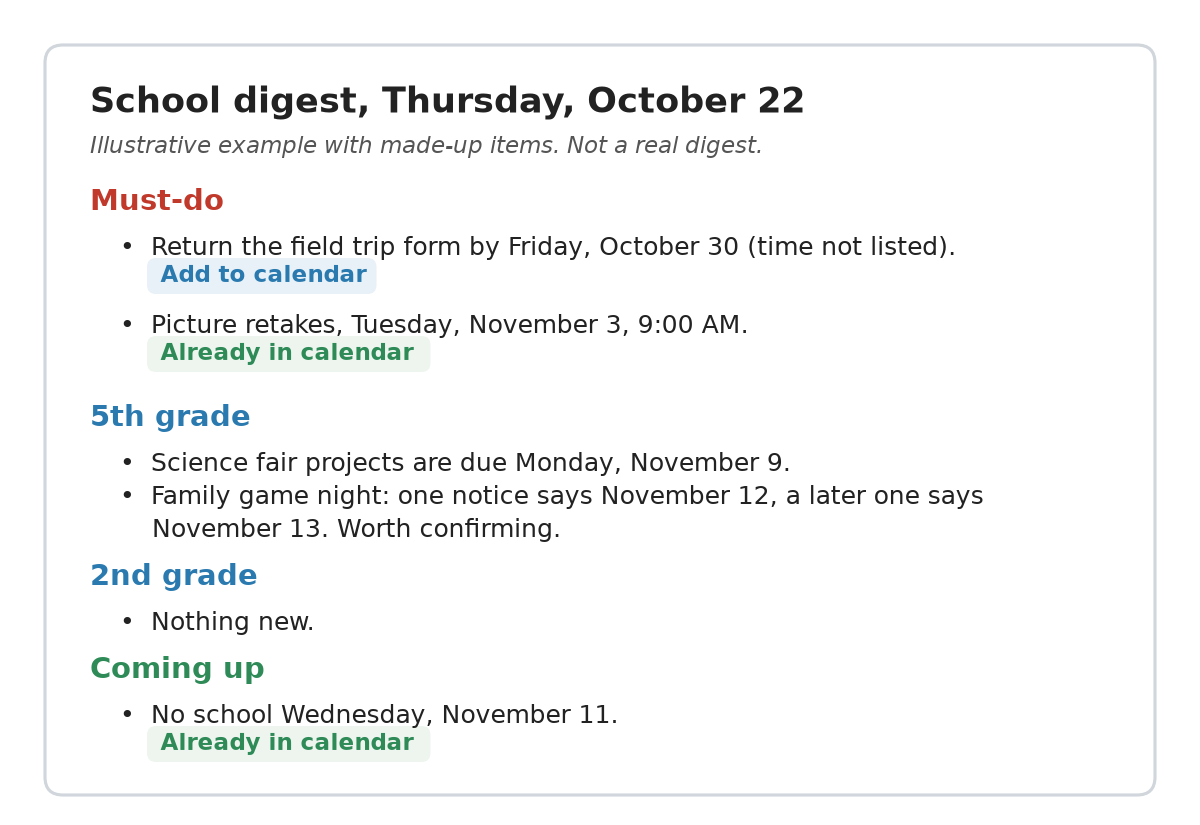
An illustrative digest with made-up items, to show the format. The real ones are private.
Before it writes, the bot also checks my Google Calendar. If a must-do is already on it, the digest says “Already in calendar”. If it isn’t, the item gets an “Add to calendar” link, so adding it takes one click. And if nothing new came in, the bot sends nothing at all, so an email from it always means there’s something to read.
The digest goes from the bot’s own Gmail account to a mailing list that Mimi and I share. From September 9 to October 20 it sent 44 digests, 40 daily and 4 weekly. That’s about 7 emails a week in place of 30-plus emails and an app. I’d estimate it saves me 30 to 45 minutes of reading a week.
We both read the digest every day, and it has cut down the time I spend keeping up with all the notifications. Another benefit is that my day has far fewer interruptions. Instead of switching over every time an email or a message comes in, I let them pile up and read them all at once in the digest. It has also made it less likely that something falls through the cracks, and the calendar links have made it easy to keep my calendar up to date. Mimi and I share our calendars with each other, so whatever I add, she can see too.
Here are a few of its catches from the first six weeks:
- A school event that was posted only in TalkingPoints, with the details on a linked newsletter page. Reading email alone would have missed it.
- Two notices gave different dates for the same family night, and the later date was the same evening as an event at the other school. The digest flagged it so we could check.
- A calendar entry labeled with the wrong school, and another that ran half an hour longer than the school said.
- A newsletter that printed last year’s date for this year’s parade.
- A reading test on the same day as two appointments. A later teacher message showed it had already been handled, so the digest told us there was nothing to reschedule.
What Is the Bot Not Allowed to Do?
The bot can read a lot: my Gmail, my calendar and TalkingPoints. If it could also write to all of those, one bad run could send an email in my name to a teacher, move an event on my calendar or reply in a class conversation. So most of its rules are about what it can’t do.
- It never sends from my account. It has its own Gmail account, and it only sends to our shared list. It can only read my Gmail.
- It never creates, changes or deletes a calendar event. It reads the calendar, and one of us clicks “Add to calendar”.
- It never replies to the school, by email or in TalkingPoints.
- It never invents a detail. If a time or a place isn’t in the source, the digest says so.
- It works out every day of the week itself from the date. It never copies one from a message or trusts its own guess.
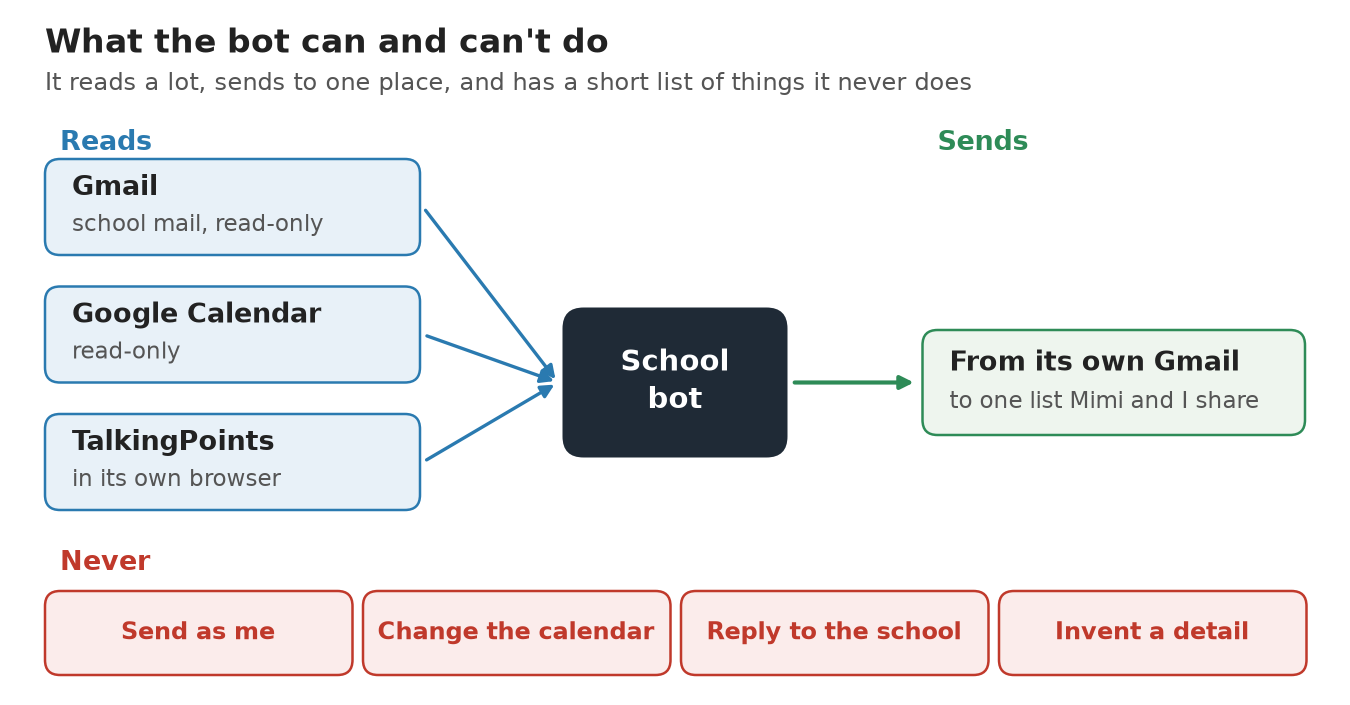
What the bot can read, where it can send, and what it never does.
TalkingPoints needed the most care. It has no API, i.e. no official way for a program to read it, so the bot reads it the way a person would, in a web browser. I run the bot on Grok Bot, which runs its bots on a cloud computer with a web browser, and the bot stays signed in to TalkingPoints there between runs.
Signing in to TalkingPoints takes a code sent by text message to a phone number that the school manages. So, when the session expires, the bot stops and asks me to sign in. I click “Open computer” in Grok Bot, take over the bot’s screen, type in the code from my phone and hand control back. I looked into giving the bot a virtual phone number so it could read its own codes, and decided against it. The number is managed by the school, and a number the bot could read would be a key to the account. So for now, I type in the code myself, and I’ll revisit that if it starts happening often.
What Went Wrong?
Quite a bit, and the failures that matter most are the quiet ones. A crash is easy to spot, since no digest shows up. A digest that looks complete but isn’t is much worse, because you trust it.
- On September 11, the bot took the day of the week from the text of a message instead of from when the message was sent. By the end of September it had mixed up weekdays on its own too, so now it calculates every weekday from the date.
- On October 10, the weekly email skipped TalkingPoints without saying so. Now the bot has to check TalkingPoints on every run, and if it can’t, a warning goes at the very top of the digest.
- On October 11, a digest arrived full of raw formatting code, e.g.
<h3>where a heading should have been. Now a small program checks every email before it’s sent, and the bot isn’t allowed to send until the check passes. - On October 15, the bot reported that TalkingPoints had signed it out. It hadn’t. The bot had judged from the app’s front page alone. A corrected digest went out the same day, and now the bot confirms a sign-out by opening a page that only a signed-in user can reach.
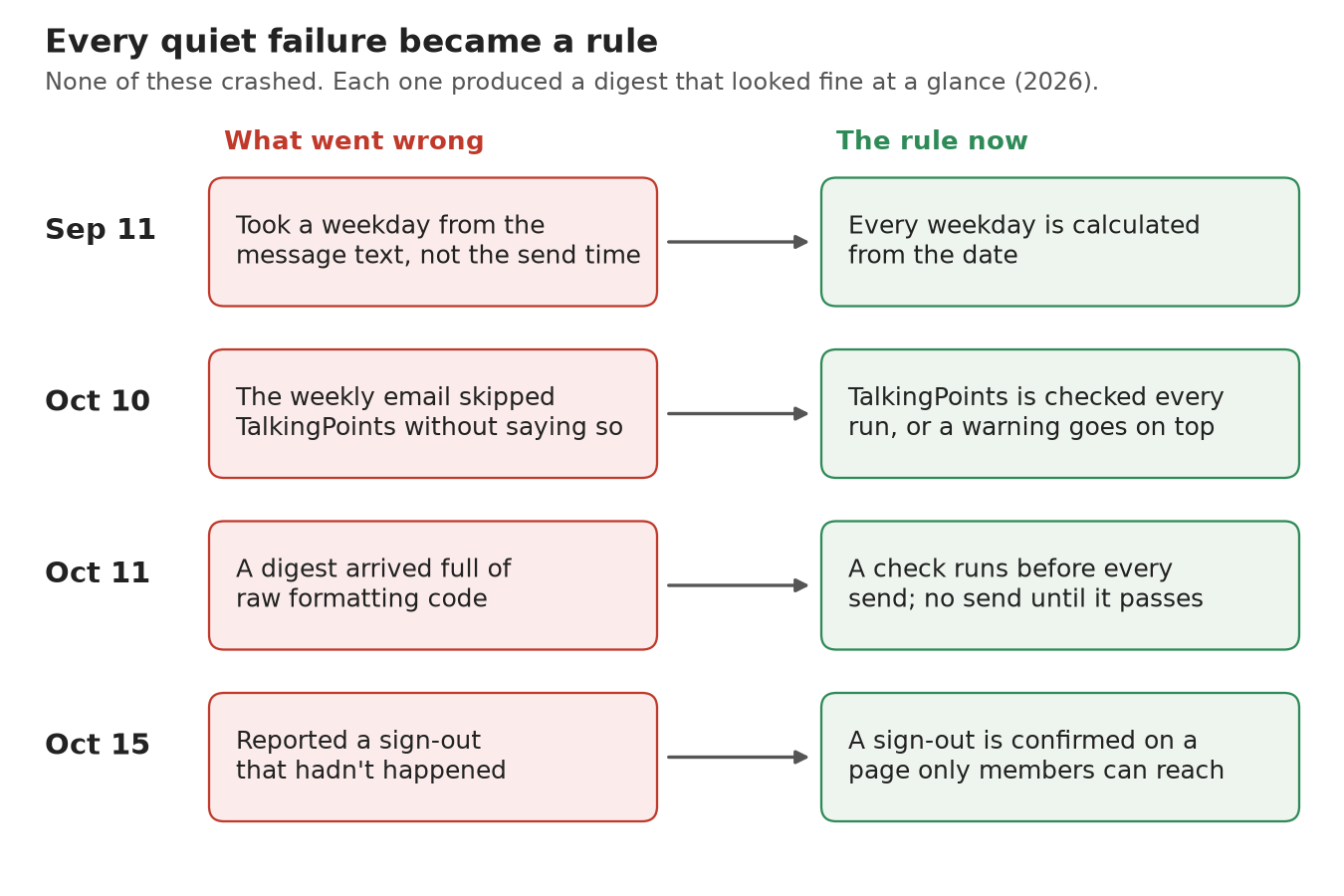
The four quiet failures, and the rule each one became.
If you recall from my post on random seeds, the dangerous results there didn’t crash either. They looked convincing. A digest that quietly skips a source is the same kind of bug, and the fix was the same kind of fix: a check that runs every time, whether or not anyone remembers it.
There were plumbing problems too. In early October, the bot’s Gmail connection lost the ability to send, so it got a backup way to send email, and a week later the cloud computer blocked that backup, by which point the Gmail connection worked again. All told, 5 of the 44 digests were corrections or second versions.
Every one of those lessons became a written rule. But written where?
Why Do the Bots Live in a Git Repo?
For the first five weeks, the bot’s setup, its instructions and its rules lived only on the cloud computer. If that computer had gone away, I would have had to rebuild the bot from memory. On October 14 the bot exported all of it into my memex, and that is where its rules live now.
My memex is a git repo of markdown files. If you haven’t used git, a repo is a folder that records every change, so you can see what changed, when, and undo any of it. Markdown is plain text with a little formatting. The name comes from Vannevar Bush’s 1945 essay “As We May Think”, where a memex is a device in which a person “stores all his books, records, and communications”, so that it “may be consulted with exceeding speed and flexibility.” Mine is less grand than that.
I started it because AIs kept tripping over my documents. I had pointed Claude at my Google Drive, and when it edited a Google Doc, it would create a new version of the document instead of changing the one I had, which got messy and tedious fast. Claude has its own documents that it can edit, but other AIs can’t easily read them. Most AIs also couldn’t search my Drive well enough to find things, so I often ended up exporting documents to PDF and uploading them by hand. A note-taking app wasn’t the answer either, since you’re limited to the structure and features the app gives you. A folder of markdown files, on the other hand, seems to be something an AI can work with natively. So I downloaded my Drive, had the AI summarize the non-sensitive parts into the memex, and now any AI I use can read and update the same notes. I also have the full history of every change.
Every note starts with a short header that says what it is, when it changed and how private it is. A checker reads every note, a script builds an index of all of them, and a decisions log records each ruling with its date. 185 automated tests run on every change. There is even a cleanup pass I call “dream”, which checks, re-indexes and tidies up the notes.
Each bot has a profile in the repo called BOT.md. It records where the bot runs, its
instructions word for word, what it has access to, the decisions it must follow and every
lesson above. Changes to it arrive as a pull request, which is a proposed change I can read
before I accept it, and the bot is expected to update its profile whenever its setup
changes. So, if the cloud computer disappeared tomorrow, I could rebuild the bot from
what’s in the repo.
Having the profile has one more advantage. Because the bot already knows how it works and what was in the latest newsletters, I don’t have to explain anything when I ask it a question. I just ask, e.g. whether anything changed for a field trip, and it has the context.
What Would I Do Differently From Day One?
The school bot came first, and it grew its rules one failure at a time. The bots I’ve built since start from a template, and they go a step further: everything they produce, not just their profile, arrives in the memex as a pull request. I cleaned up that template and published it as memex-bots. This part is more technical, so feel free to skim. These are its rules.
- The AI finds and judges, and ordinary code decides. The AI searches with its own tools and writes down what it found. A small Python program checks that, scores it and writes the digest. Because the scores come from code, the same input always gets the same result.
- Every item needs a source. An item without a link and a short quote is dropped, and the digest says how many were dropped.
- Every run is one pull request, never a direct change. GitHub enforces that, and it also requires CI to pass first. CI, short for continuous integration, is the set of automated checks that run on every proposed change.
- A file named
PAUSEDstops a bot, and a cap on unreviewed pull requests stops a bot that’s running away. - A failed run still opens a pull request, with a “Run problems” section that says what went wrong. That’s the October 10 lesson, built into the template.
- Every bot starts as a written plan: what it’s for, how much of my time it may take each week, what’s off-limits, when to shut it down and the open questions, all before any code.
- Every bot gets its own GitHub access token, a key that only works on the one repo and expires on a set date.
- Every bot keeps its own
BOT.mdup to date.
You can try it without an AI. Download the repo and run the example, and the program runs on sample data: it writes a digest, adds a line to a log, and lists the one item with no link under “Run problems” instead of quietly using it.
What Does It Take to Run Them?
I run my bots on Grok Bot for now, because it comes with my Cursor subscription and has a web browser built in. The template doesn’t depend on Grok Bot, though. Any AI agent that can run on a schedule, read and write files, run a program and open a pull request can run these bots, and the repo has a short guide to controlling a bot from your phone through a private Slack channel.
Grok Bot isn’t the only option anymore. OpenAI’s dots and Meta’s Muse are newer services that also give each AI agent a cloud computer with a browser, and each one has its own advantages when it comes to data. For example, Grok Bot appears to be able to search posts on X, and Muse can search and monitor Facebook. I’m currently using Muse to watch a Buy Nothing group for anyone giving away a golf bag.
Before Grok Bot, I built “automations” with OpenClaw, and then with Hermes because it handled failures better, using OpenRouter to choose the AI model. You can do some pretty powerful things that way, but you’re ultimately limited by the model. I’ve found that useful bots still need one of the most capable models, and the best bang for your buck right now seems to be the monthly subscriptions from the leading AI labs. Open-weight models like DeepSeek, which anyone can download and run, are promising, but in my experience they weren’t really cheaper than something like Grok Bot. My guess is that the AI companies are covering some of the cost today, so that could change.
Whichever service you use, I’d encourage you to build a bot for whatever keeps piling up in your inbox. Run it by hand for a few days and check every digest against the original messages before you put it on a schedule, and every time it gets something wrong, add a rule. I’m planning a follow-up post with step-by-step directions for building a school digest bot like this one. And if a bot turns into something you rely on, that’s the time to write its rules and profile down in a repo, so its memory belongs to you and it can move to the next service with you.
Thanks for reading.