Turnkey Data Analysis Using DuckDB and Metabase for PostgreSQL & CloudWatch
How we used DuckDB and Metabase to streamline our data analysis workflow, enabling us to build an email list to contact our frequent users.

Data Analysis with DuckDB and Metabase. Image credit: Author
Back in July 2023, my friend and I were excited about building something with a Large Language Model (LLM). At that time, we noticed ChatGPT had no native internet access. ChatGPT did roll out a beta feature providing Bing search access, but it was retracted shortly after its release. We observed several ChatGPT plugins offering internet access, but none were free. Anticipating OpenAI’s reintroduction of Bing search, we decided to quickly develop our own web search plugin for ChatGPT to attract some users.
After spending a few days coding and setting up AWS infrastructure, we successfully launched our MindfulDataAI Search Plugin in the ChatGPT Plus store. Impressively, OpenAI approved our plugin within hours. Within days, we observed thousands of web searches being conducted through our plugin. This success spurred us to explore other ideas, such as developing business tools for ChatGPT. We knew our plugin’s relevance might be short-lived, but we were hopeful that we could identify a business-specific problem before then. Indeed, this was underscored in September 2023 when ChatGPT reintroduced Bing search.
Surprisingly, even after the reintroduction of ChatGPT’s native Bing search, a significant number of users continued using our plugin. Intrigued by this preference, we sought to understand the underlying reasons.
Our challenge was to analyze user data efficiently. User activities were logged, and email addresses were stored in a PostgreSQL database. Initially, we used CloudWatch Insights to identify the most active users, followed by PostgreSQL queries to look up their email addresses. This method was effective but disjointed. I was also looking for an opportunity to experiment more with DuckDB, so I decided to create an open-source repository, called QuackMeUp, along with a guide to help others perform this type of data analysis more efficiently.
In the following sections, we’ll discuss how we used DuckDB and Metabase to streamline our data analysis workflow, enabling us to build an email list so that we could contact our users to understand why they still preferred our plugin.
DuckDB & Metabase
DuckDB is an in-memory, columnar database optimized for quick analytical queries. Its main advantages are speed, ease of setup, and SQL compatibility. It’s particularly useful for fast data analysis without heavy resource requirements.
Metabase is a user-friendly, open-source BI tool. It allows easy data querying and visualization, even for non-technical users. Metabase supports various data sources and is known for its intuitive interface and collaboration features.
Why Use Them?
For MindfulDataAI, DuckDB offers the speed we need for analyzing logs and PostgreSQL data, while Metabase makes data visualization and sharing straightforward. This combination aims to streamline our data analysis, merging different data sources efficiently and reducing complexity.
Next, we’ll explore how we integrated these tools into our workflow and the insights we gained.
High-Level Overview of the Solution
Let’s start with an overview of the key components of our solution:
- Modify the app’s code so that it logs in JSON format.
- Deploy a scheduled AWS Lambda function that will automate the export of CloudWatch logs to an S3 bucket.
- Download the logs from the S3 bucket using the
aws s3 synccommand. - Run a Python script to extract JSON segments from the logs and save them as
.jsonfiles. - Configure DuckDB to connect to your PostgreSQL instance and to access these
.jsonfiles. - Use Metabase for business intelligence. This setup will enable you to join datasets and create useful analytics dashboards.
This is how the pipeline works:
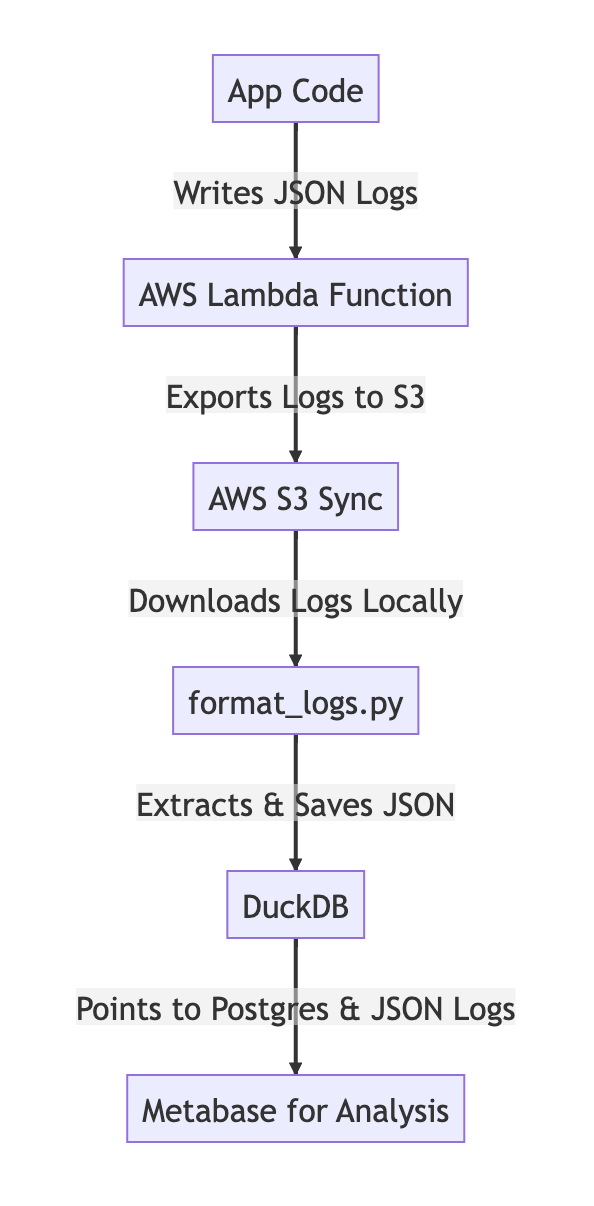
End-to-End Data Pipeline for Business Analytics. Image credit: Author
The Detailed Solution
Download the GitHub repo
To make it faster to get started, I’ve packaged all the code in a GitHub repo that you can download with:
git clone https://github.com/redgeoff/QuackMeUp
Then, cd QuackMeUp so that you are ready for the next steps.
Install the dependencies
- Install Docker
- Install the awscli and run
aws configure - Install Python, e.g.
brew install python@3.11 python3.11 -m pip install poetrypoetry install- Install the Git hooks for code formatting with black:
poetry run pre-commit install - Install DuckDB, e.g.
brew install duckdb
Configure the .env file
cp .env.example .envand then edit.env- Choose a value for
TERRAFORM_BUCKET_NAMEthat will be unique across all AWS users, e.g.myorg-quackmeup-terraform-bucket, wheremyorgis a unique name for your organization. This bucket will be used to remotely store your Terraform state. - Choose a value for
LOGS_BUCKET_NAMEthat will be unique across all AWS users, e.g.myorg-quackmeup-logs, wheremyorgis a unique name for your organization. This bucket will be used to store logs exported from CloudWatch. - Be sure to substitute the value of
PG_CONNECTION_STRINGwith the connection string for your Postgres instance. Ideally, you’d use the connection string for a read replica. - You can leave the rest of the values in
.envintact unless you prefer them to be different.
Deploy the infrastructure
Load the AWS Console and manually create an S3 bucket with the same name that you specified for TERRAFORM_BUCKET_NAME.
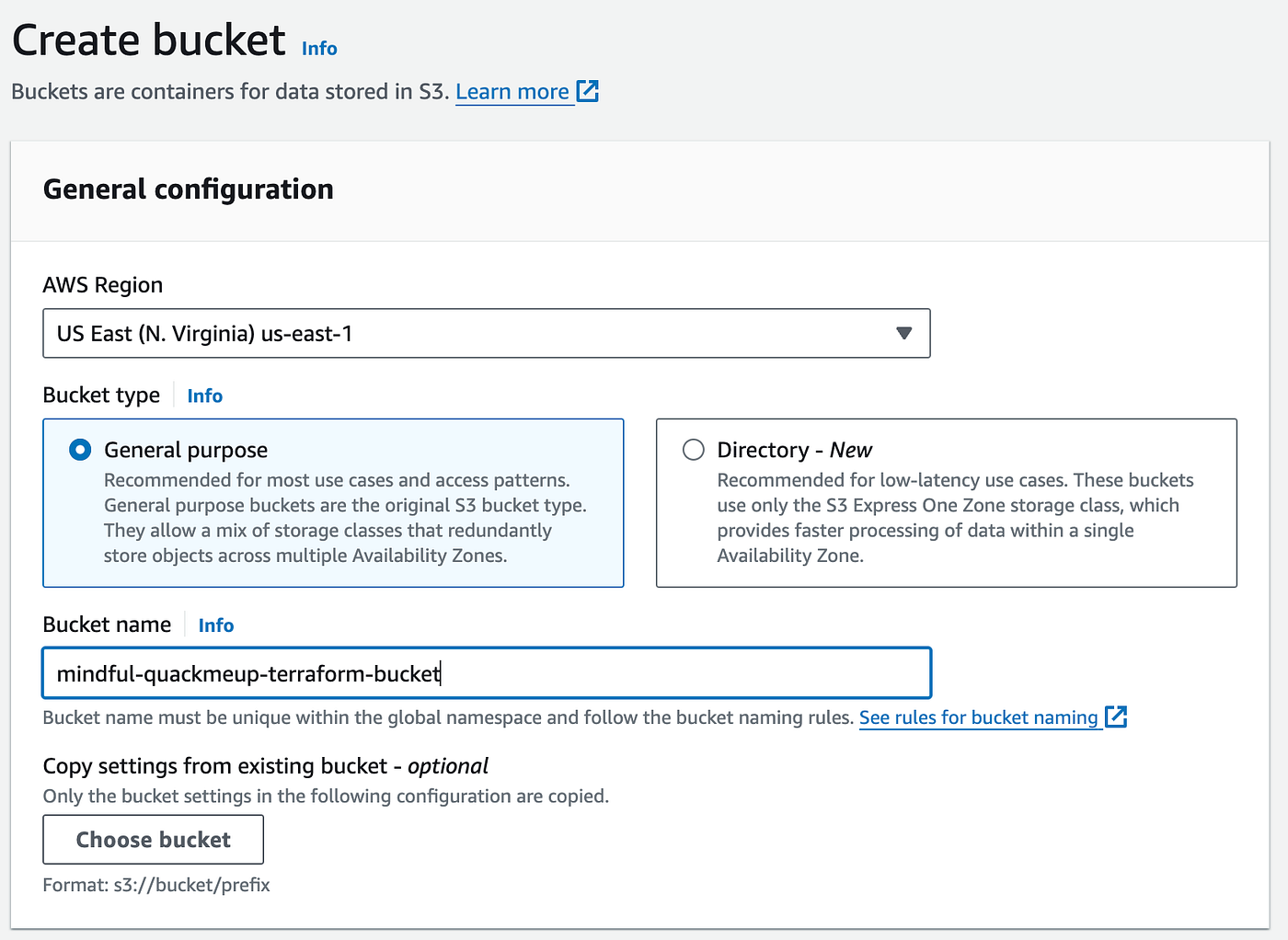
Create S3 bucket for Terraform state. Image credit: Author
Initialize the terraform environment: ./terraform/init.sh
Make sure the terraform plan doesn’t error out: ./terraform/plan.sh
The following apply.sh script will then:
- Create an S3 bucket for
LOGS_BUCKET_NAME - Create an ECR repository for the Lambda code
- Build and push a Docker image to this ECR repository
- Schedule a Lambda (using the Docker image) that will export the latest CloudWatch logs to the S3 bucket every 4 hours
- Create IAM policies and roles as needed
Deploy the infrastructure with ./terraform/apply.sh
Tag target logs for export
Open the AWS Console and navigate to the CloudWatch Log Groups page. For each log that you wish to be exported to S3, simply add a tag with Key=ExportToS3 and Value=true. The log exporter Lambda runs every 4 hours so you’ll have to wait at least 4 hours before you start seeing any data in the S3 bucket.
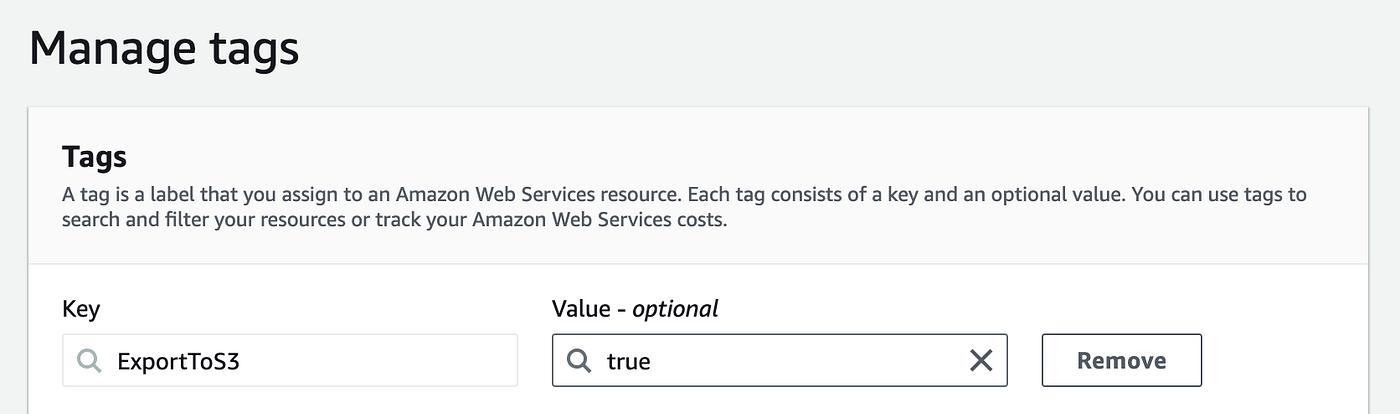
Tag CloudWatch logs for export. Image credit: Author
Install QuackMeUp
- Create the DuckDB instance:
./scripts/duckdb/create_db.sh - Attach the Postgres instance to DuckDB:
./scripts/duckdb/attach_postgres.sh - Build the Docker image that will run Metabase with DuckDB support:
./scripts/metabase/build_docker.sh - Run the Docker containers:
docker-compose up -d - Seed the Metabase config so that you can just log in:
./scripts/metabase/import_db.sh
Execute the pipeline
After the logs have been updated, run the following pipeline to ingest the updated data into DuckDB:
- Use
s3 syncto download the logs from S3:./scripts/s3/download_logs.sh. Note: if you have a lot of data, this can take a while when it is first run. - Run a Python script to extract the JSON payloads in the logs so that they can be analyzed with DuckDB:
make format_logs - Create a DuckDB table pointing to the extracted logs:
./scripts/duckdb/import_logs.sh - Restart Metabase so that it loads the updated DuckDB:
docker restart quackmeup-metabase-1
Accessing Metabase
You can then access Metabase by visiting http://localhost:3000 and logging in with:
- Email:
quackmeup@example.com - Password:
E!v_#nc$48pqfZJ
Troubleshooting
DuckDB is incredibly fast because it stores a substantial amount of data in memory. If you encounter errors related to insufficient memory, it’s advisable to open the Docker console and increase the memory allocation. In our experience, for processing 3GB of zipped logs, we needed to increase the memory allocation to 10GB. Alternatively, you can modify the format_logs.py script so that it filters out any JSON data that you don’t need.
Example Analysis
Now that we’ve got QuackMeUp running, we can start doing some data Analysis. The following section is specific to our data, but it will help you to visualize the power of the QuackMeUp Analytics pipeline.
Recall that in the case of MindfulDataAI, we want to get the email addresses of all the frequent users. In our particular case, the search requests are logged in payloads like the following:
{
  "json": {
    "asctime": "2024-01-08 23:57:51,020",
    "name": "my_logger",
    "levelname": "INFO",
    "message": "Response",
    "code": "RESPONSE",
    "request": {
      "method": "GET",
      "path": "/search",
      "query": {
        "query": [
          "number of tourists in Orlando 2022"
        ]
      },
      "body": …
    }
  }
}
To start, we can look at things like the number of searches each month:
SELECT
  SUBSTRING(json->>'asctime', 1, 7) AS month,
  COUNT(*) as num_searches
FROM logs
WHERE JSON_EXTRACT(json, '$.code')='"RESPONSE"'
  AND JSON_EXTRACT(json, '$.request.path')='"/search"'
GROUP BY month
ORDER BY month ASC
You can run this query in Metabase by creating a new Question:
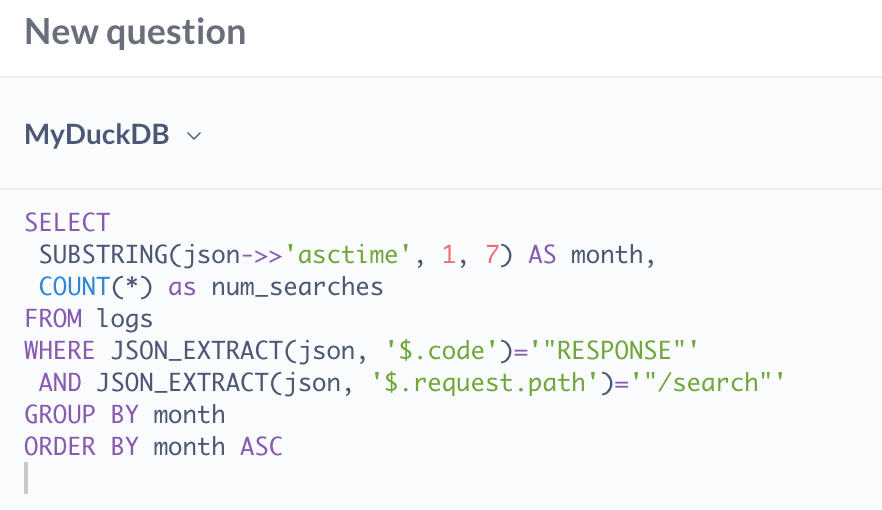
Metabase query for searches per month. Image credit: Author
And then you can render a nice-looking visualization:
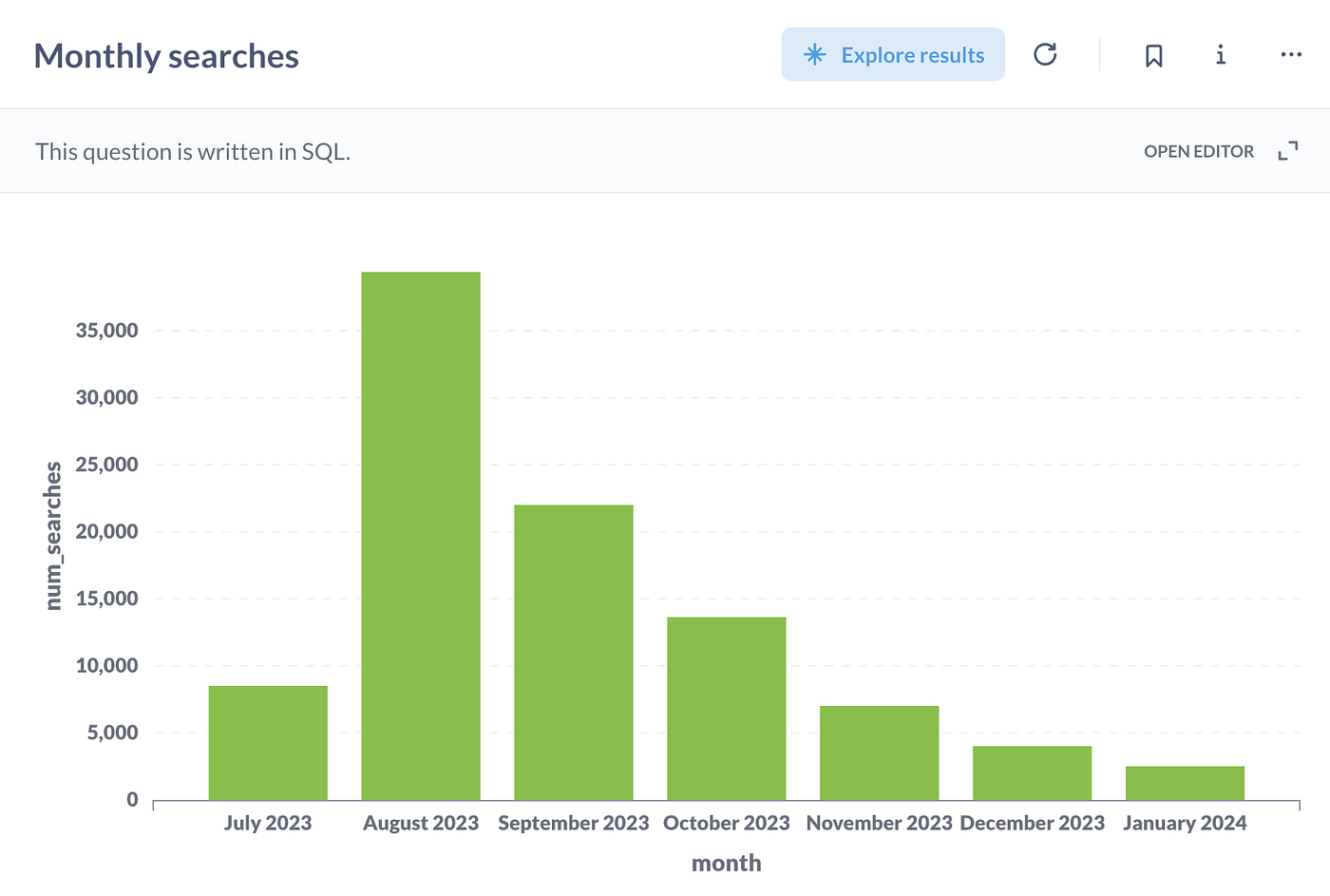
Monthly searches. Image credit: Author
Note: You may notice from our data that it contrasts with the typical “up and to the right” trend. We launched the plugin in late July, which led to a significant increase in searches in August. However, in September, OpenAI reintroduced native Bing search support in ChatGPT. Since then, the number of searches using our plugin has nearly halved each month! 😱. Nonetheless, we still retain a user base, and we are interested in contacting them to understand why they prefer our plugin over the native Bing search.
We utilize Supabase and its OAuth integrations, which means the users’ email addresses are stored in a PostgreSQL table named users. By joining the searches and users using the user_id, we can compile a list of users with the highest number of searches:
SELECT
  s.num_searches,
  s.user_id,
  s.first_search,
  s.last_search,
  u.raw_user_meta_data->>'name' as name,
  u.email
FROM (
  SELECT
    COUNT(*) as num_searches,
    json->>'request'->>'headers'->>'MINDFULDATAAI_USER_ID' as user_id,
    MIN(SUBSTRING(json->>'asctime', 1, 11)) as first_search,
    MAX(SUBSTRING(json->>'asctime', 1, 11)) as last_search
  FROM logs
  WHERE JSON_EXTRACT(json, '$.code')='"RESPONSE"'
    AND JSON_EXTRACT(json, '$.request.path')='"/search"'
    AND user_id IS NOT NULL
  GROUP BY user_id
) s JOIN users u ON u.id=s.user_id
ORDER BY s.num_searches DESC
LIMIT 10
And when run, Metabase will give you a table of data that can easily be exported to a CSV file:
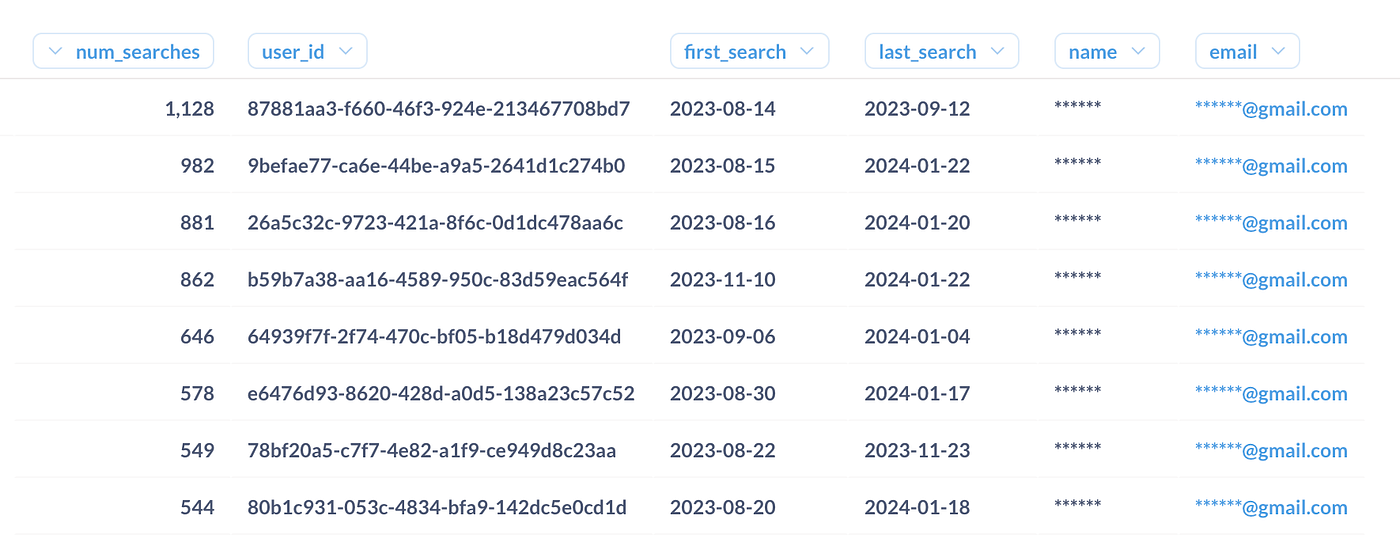
Image credit: Author
We just joined the JSON log data (searches) with the Postgres data (users) in a single query using DuckDB. Isn’t that cool?! 😎
Although this solution was somewhat more complex than necessary, it has provided us with a robust pipeline that enables further analysis through the crafting of new SQL queries.
Alternative Solutions
While the combination of DuckDB and Metabase presents an efficient and effective approach for data analysis in our scenario, it’s important to consider alternative solutions that might better align with different requirements or preferences. For example, you may want to consider a hosted version of Metabase that can be shared with your coworkers. Alternatively, you might prefer not to have to re-execute the entire pipeline whenever there are changes. Here are some noteworthy alternatives:
1. Using Presto or Athena for Querying:
Presto, an open-source distributed SQL query engine, and Athena, the AWS managed version of Presto, are powerful tools for querying data across various sources like S3 and PostgreSQL. By employing either of these, you can execute SQL queries across your data lake and database without the need to load data into an analytics tool. This approach can significantly reduce the memory footprint of your Metabase instance, as it doesn’t require storing large datasets for querying purposes.
2. Analytics Postgres Database for Reporting:
Another approach is to set up a pipeline that selectively copies key log events and PostgreSQL data into a dedicated analytics database. This strategy can streamline the data analysis process, particularly for creating an analytics dashboard aimed at end-users. By isolating the analytics data, you can optimize the database schema for reporting and ensure that your production databases are not burdened by heavy analysis queries.
3. Exploring Other BI Tools:
While Metabase is known for its user-friendliness and simplicity, other Business Intelligence tools like Superset, Looker, or Tableau might offer additional features or better integration with existing systems. Each of these tools has its unique strengths — for example, Superset is highly customizable, Looker excels in creating complex data models, and Tableau is renowned for its data visualization capabilities. Depending on the specific needs and existing tech stack of your organization, one of these alternatives might be a more suitable choice.
4. Utilizing Snowflake, BigQuery, or Redshift:
For more robust data warehousing solutions, Snowflake, Redshift, or BigQuery can be considered. These platforms are designed to handle large volumes of data and complex queries efficiently. They can directly query data stored in S3 and integrate with PostgreSQL, similar to DuckDB. However, they offer additional features like automatic scaling, extensive support for different data formats, and advanced security features. These platforms are particularly beneficial for organizations dealing with massive datasets and requiring a comprehensive data warehousing solution.
In conclusion, while our implementation with DuckDB and Metabase offers a streamlined and effective solution for our needs, these alternative solutions provide different benefits that could be more aligned with other specific requirements or preferences. The choice of tools and architecture depends greatly on the scale of data, specific use cases, and the existing technical infrastructure of the organization.
Conclusion
In wrapping up our journey with DuckDB and Metabase, the key takeaway is the value of simplicity and efficiency in data analysis. Our experience with the MindfulDataAI Search Plugin highlighted how the right tools, like DuckDB and Metabase, can simplify the process of merging different data sources and extracting meaningful insights quickly.
These tools enabled us to analyze log data and PostgreSQL records effectively, leading to a better understanding of user preferences and improving our services. However, it’s essential to recognize that different scenarios may call for different tools. Alternatives like Presto, Athena, or other BI tools might be more suitable in varying contexts.
Ultimately, the goal is to choose a solution that is not only effective but also aligns with your project’s specific needs and technical environment. This approach ensures that data analysis remains a practical and valuable asset in decision-making processes.
Want to use ChatGPT in Slack?
At MindfulDataAI.com, we offer Arty, an app that integrates ChatGPT with Slack. Arty can be used in group settings or one-on-one, seamlessly incorporating ChatGPT and web search capabilities directly into Slack.